I’ve been obsessed with automation for years. I’m talking about the kind of obsession where you spend hours trying to automate a five-minute task, convinced that “someday” it’ll pay off. And if you’re reading this, you’re probably just like me – always looking for the next productivity hack.
So when I discovered n8n, I was ecstatic. It’s like Zapier, but open-source and infinitely more flexible. But there’s one massive problem that nobody talks about: building complex workflows in n8n can be a total nightmare.
The Problem Nobody Wants to Admit
Let’s be honest: n8n is powerful but has a learning curve steeper than San Francisco’s Filbert Street. The documentation is decent, but when you’re trying to build something complex, you end up in this loop:
-
Think of what you want to build
-
Spend hours figuring out how to implement it
-
Get frustrated
-
Start over
-
Repeat until you either solve it or give up
I’ve abandoned more half-built n8n workflows than I care to admit. And I’m not alone – there’s a graveyard of automation dreams out there.
I Tried Everything (And Wasted Thousands)
When LLMs became a thing, I thought I had found the solution. I spent a ridiculous amount of money on API credits trying to get ChatGPT, Claude, and every other model to generate working n8n workflows for me.
The results? Pure garbage.
These models would confidently generate workflows that looked plausible but failed spectacularly when implemented. They’d hallucinate nodes that don’t exist, miss crucial configuration steps, or completely misunderstand n8n’s execution flow.
Then came the specialized tools claiming to “automate your automation.” I tried every single one. Some were marginally better, but none actually delivered what they promised. I was about to give up on my automation dreams altogether.
The Accidental Discovery That Changed Everything
I stumbled upon DeepWiki while procrastinating on Reddit. Someone mentioned it in a comment thread about developer tools, and it sounded too good to be true.
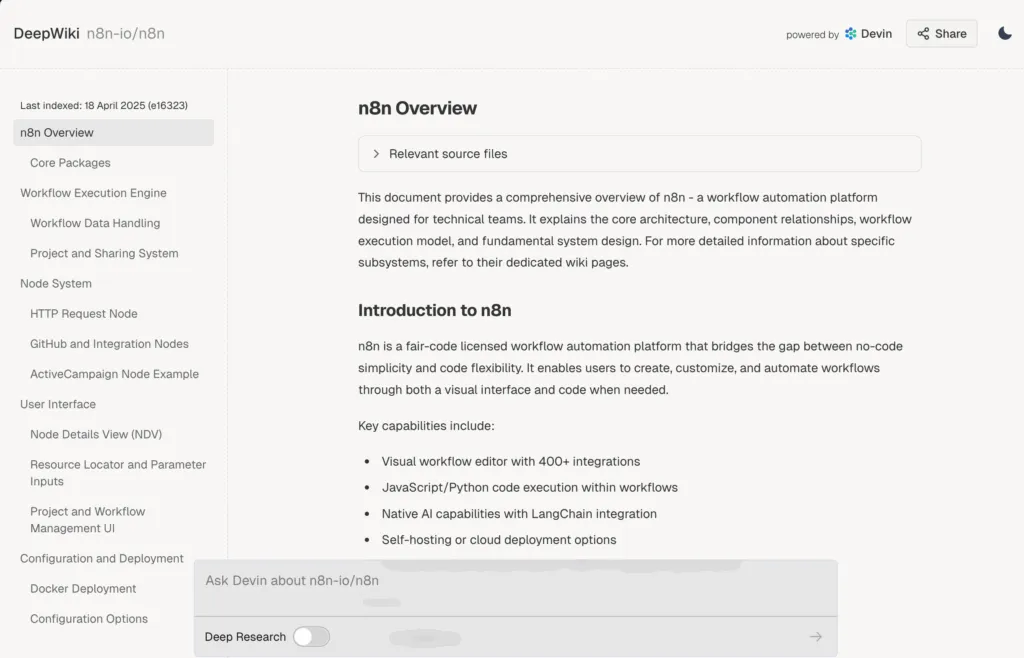
DeepWiki isn’t marketed as an n8n tool at all. It’s an AI assistant that actually analyzes the source code of open-source projects to understand them at a fundamental level. This is completely different from how other LLMs work – they’re trained on internet data but don’t specifically analyze source code repositories.
Skeptical but desperate, I decided to give it a shot with n8n.
The DeepWiki Difference
The first thing I asked DeepWiki was how to approach a complex workflow I had been struggling with – pulling data from multiple APIs, transforming it, and pushing it to a database with conditional logic.
The response blew me away. Instead of the usual generic advice, DeepWiki explained the exact execution model of n8n, pointed out common pitfalls, and suggested an architecture that made perfect sense.
Then I asked it to generate a workflow for me, and while it wasn’t perfect (nothing ever is), it was astonishingly close. The reasoning was solid, and the accuracy of the nodes and their configurations was far beyond anything else I’d tried.
Here’s why DeepWiki works where others fail:
-
It understands n8n’s source code: DeepWiki doesn’t just know about n8n from documentation – it analyzes the actual implementation.
-
It grasps the execution model: n8n’s execution flow is unique, and DeepWiki gets that. It understands how data moves through nodes and how to handle things like loops and errors.
-
It knows about edge cases: Because it’s examined the code, it warns you about gotchas that aren’t obvious from the docs.
The DeepWiki Workflow
If you want to use DeepWiki for n8n (and you absolutely should), here’s my process:
Step 1: Define Your Problem Clearly
Before approaching DeepWiki, get crystal clear on what you’re trying to accomplish. I write out:
-
The data sources and destinations
-
The transformations needed
-
The trigger conditions
-
Any error handling requirements
Step 2: Ask DeepWiki for an Approach
Don’t jump straight to “give me a workflow.” Instead, ask something like:
“I want to create an n8n workflow that monitors a Gmail account for emails with specific attachments, extracts data from those attachments, and sends it to Airtable with specific formatting. What’s the best approach to structure this workflow?”
DeepWiki will give you a high-level architecture that makes sense for your specific problem.
Step 3: Ask Clarifying Questions
Based on the approach, dig deeper:
“How should I handle pagination when retrieving large datasets from the API?"
"What’s the best way to implement error handling for this specific scenario?"
"How can I make sure this workflow is efficient and doesn’t run into timeout issues?”
Step 4: Request the Workflow Generation
Now you can ask for a specific implementation:
“Can you generate the JSON for an n8n workflow that implements this approach? Focus particularly on the data transformation logic between the API and Airtable.”
Step 5: Implement and Refine
Even with DeepWiki, you’ll likely need to make some adjustments. But instead of starting from scratch, you’re fine-tuning a solid foundation.
If you run into issues, go back to DeepWiki with specific questions about the implementation.
Real-World Examples That Worked
I’ve used this process to build several complex workflows that I had previously abandoned:
-
Content Repurposing Pipeline: A workflow that takes my blog posts, extracts key points, generates social media posts for different platforms, schedules them, and then monitors engagement to report back.
-
Customer Data Integration: Pulling customer data from Stripe, enriching it with data from Clearbit, checking for certain conditions, and then pushing it to my CRM with custom fields and tags.
-
Automated Support Triage: Monitoring support tickets, using sentiment analysis to prioritize them, and routing them to the right team member based on content and customer history.
Each of these would have taken me days to figure out manually. With DeepWiki, I had working prototypes in hours.
The Limitations (Because Nothing’s Perfect)
DeepWiki isn’t magic, and I need to be honest about where it falls short:
-
Community Nodes: It’s better with core n8n functionality than with community nodes, though it still understands their general purpose.
-
Very New Features: If a feature was just added to n8n, DeepWiki might not know about it yet.
-
UI Specifics: It generates the workflow structure, but occasionally misses some UI-specific settings that aren’t obvious from the code.
But these limitations are minor compared to the alternatives, which usually produce completely non-functional workflows.
Why This Matters
Time is the only thing we can’t get more of. Every hour spent fighting with automation tools is an hour lost forever.
What excites me most about the DeepWiki approach isn’t just that it saves time now – it’s that it actually helps you learn n8n properly. By explaining the reasoning behind its suggestions, it teaches you how to think about workflow automation the right way.
I’ve learned more about n8n’s internal logic from DeepWiki than from months of reading documentation and forum posts.
The Future of Automation Development
This approach – having AI that actually understands code at a deep level rather than just generating it based on patterns – feels like the future. It’s the difference between having a coach who played the game professionally versus one who just read the rulebook.
I predict we’ll see more tools like DeepWiki emerge for other complex systems, and the days of banging our heads against technical documentation will eventually seem as outdated as looking up facts in an encyclopedia.
Bottom Line
If you work with n8n and value your time, DeepWiki is the best-kept secret in automation right now. It’s not marketed for this use case, but it works better than anything specifically designed for it.
I might finally finish all those automation projects that have been sitting on my to-do list for months. And for once, the time invested in automation will actually pay off.
Go try it. Your future self will thank you.